


Instagram unfollow tracker: does this account still follow me?
Instagram only shows the current follower count, with no history and no changes. The SocialChecker app watches public Instagram profiles and records two things: how the follower count develops over time, and which accounts the profile starts or stops following, each with a date.
The most common question is “who unfollowed me on Instagram?”. For individual accounts the app answers it precisely: add the account, and as soon as it removes you from its following list, the change shows up in the history with a date. What SocialChecker does not give you is a list of everyone who unfollowed you. The app compares the following lists of watched profiles, not their follower lists. For your own profile you see when and by how much your follower count drops.
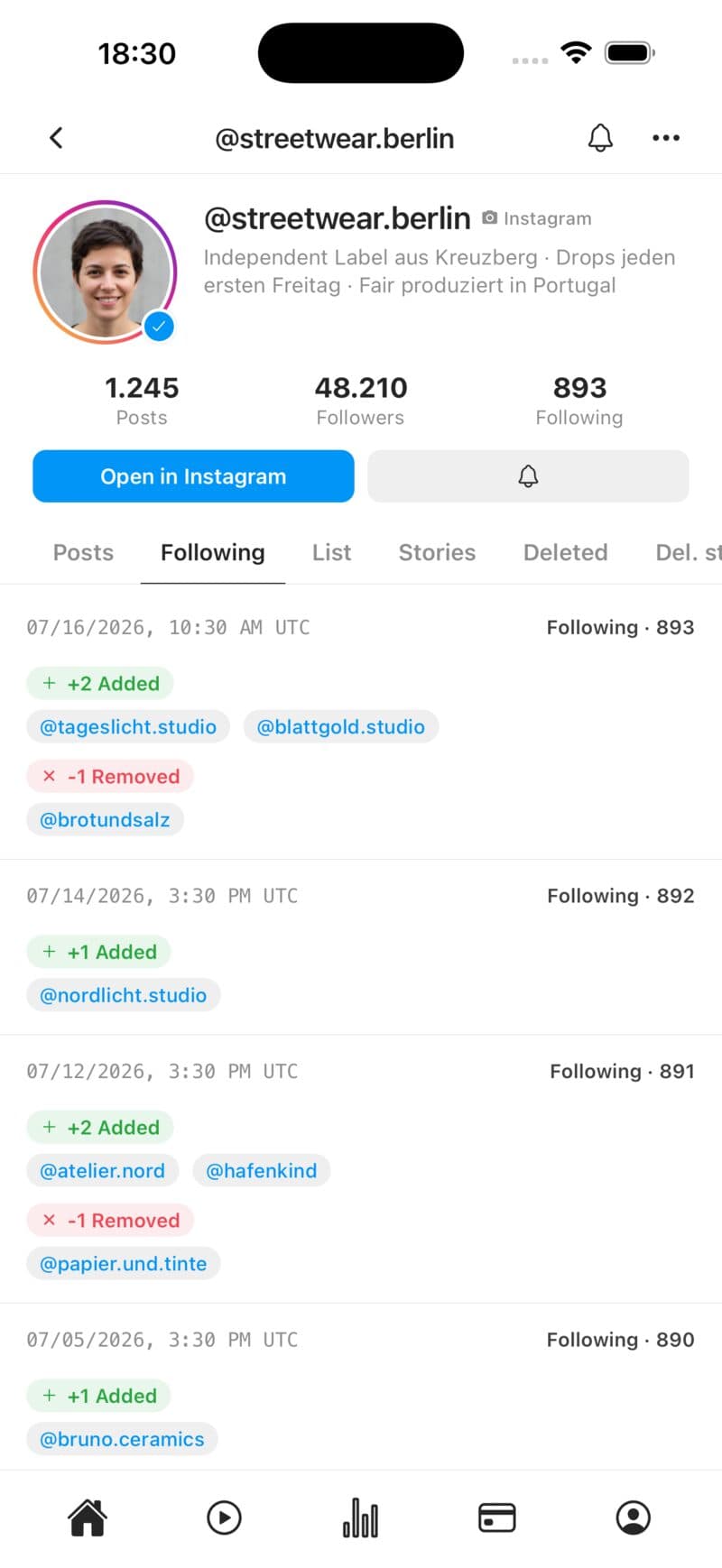
What the app records
Follower count history
The app stores the follower count on every check. That gives you a curve showing jumps and trends, for example after a campaign or a successful post. Larger jumps also show up in your feed.
- Follower count over time
- Larger jumps in your feed
- For your own and other public profiles
Who a profile starts following
When the following count changes, SocialChecker loads the following list and compares it with the previous state. Newly followed and dropped accounts are listed by name and date.
- Newly followed accounts
- Accounts no longer followed
- History with dates
Everything in one place
The app checks watched profiles several times a day. New posts and stories come as push notifications, following changes and follower jumps land in your feed. No comparing lists by hand.
- Automatic checks several times a day
- Push for new posts and stories
- Changes collected in one feed
For competitor research
Watch public profiles in your niche: how are they growing, who are they connecting with? Depending on your plan you track 3 (Basic), 10 (Premium) or 50 profiles (Ultra) across Instagram, TikTok and Snapchat.
- Several profiles in parallel
- Instagram, TikTok and Snapchat (Premium and up)
- Swap profiles at any time
How it works
Add a profile
Get the app, sign in and enter the username of a public Instagram profile, your own or someone else’s.
Automatic tracking
From now on SocialChecker stores the follower count and compares the following list whenever it changes.
Check the history
The profile shows the follower curve, and the Following tab shows which accounts were added or dropped.
Follower tracker FAQ
Can I see who unfollowed me on Instagram?
Not by name for all your followers. SocialChecker compares the following lists of watched profiles, not your follower list. You see when and by how much your follower count drops, but not exactly who left.
How do I find out whether a specific account still follows me?
Add that account in the app. If it removes you from its following list, the change shows up in the history. This only works for public profiles, and for very long lists Instagram does not always return every entry.
How do I see who does not follow me back?
SocialChecker does not offer that comparison, and neither does Instagram. You have to compare your own follower and following lists. Be careful with apps that ask for your Instagram password to do it.
Will the other person notice that I watch their profile?
No. SocialChecker only reads publicly visible data. There are no follows, likes or profile visits from your Instagram account.
Does it work with private profiles?
Only partly: the follower count is still recorded, but the following list and the content of private profiles cannot be retrieved.
How often is the data refreshed?
Several times a day. The following list is reloaded whenever the profile’s following count changes.
How much does it cost?
The app is free to download; monitoring is part of the plans: Basic 3, Premium 10, Ultra 50 profiles, across all platforms combined.
Keep track of follower growth
Get SocialChecker for iOS or Android and see how follower counts develop and who watched profiles follow.